Which AI image-to-video model keeps the product intact
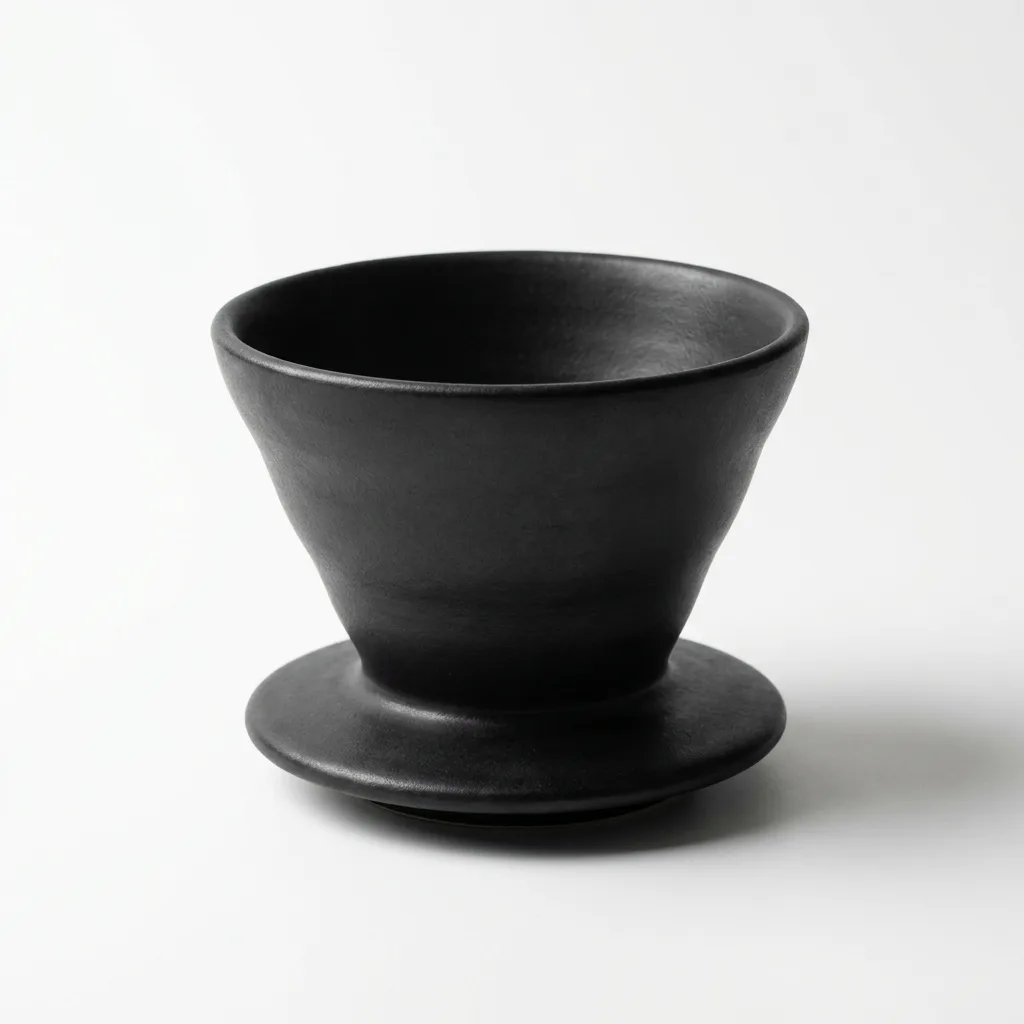
Image to video is the feature most people use in practice: start from a still and make it move. The test is whether the product stays the product. We fed 30 models the same photo of a handleless black dripper and asked for coffee to pour into it. The grid includes the September 18, October 19, October 22 and October 23 additions; each model page dates its own run.

Anvisha Pai, Co-founder & CEO, Voyager
What the side-by-side shows
Wan 3.0, Seedance 2.0 and Kling 3.0 in both tiers kept the dripper exactly as photographed and poured into it. Veo 3.1 also kept the dripper’s shape and poured into it. MiniMax H3 and Wan 2.7 added a glass carafe underneath, a reasonable reading. Gemini Omni Flash gave the dripper a handle and filled it with coffee, which is a different product. Grok reduced the pour to a few drops, Veo 3.1 Lite barely poured at all, Sora 2 pushed in so close the dripper filled the frame, and Seedance 2.5 refused the job as a copyright risk against our own photo. Models that follow the image's shape returned square clips; only the Seedance, Veo, Sora and Gemini endpoints kept 16:9. Luma Ray 3.2, added later, gave the dripper a handle as Gemini did. FLUX 3 Max, added on October 19, kept the photographed dripper exactly but poured from above and filled it like a cup. Of the 22 October additions, Wan 3.0 Prime, HeyGen Video and Grok Imagine Video 1.5 Lite kept the dripper's shape but filled it like a cup; Gemini Omni Flash 1.1 and Seedance 2.0 Mini grew a handle, as Gemini's first version did; LTX 2.5 Fast grew a pouring lip. Kandinsky 6.0 Pro kept it exactly and dripped coffee into it from a second dripper lowered above it; Kandinsky 6.0 Lite turned the clip into a fox reading a newspaper. Kling 4.0, added on 23 October, kept the dripper's shape in a 940 by 940 clip, but coffee ran down its outside from the first second and pooled on the base while it filled like a cup.
- 1.Wan 3.0 kept the product exactly and poured cleanly, for $0.50.
- 2.Seedance 2.0 the dripper as photographed, coffee pouring, 16:9 kept.
- 3.Kling 3.0 Pro faithful to the photo with a steady pour, at 1080p.
- 4.Veo 3.1 kept the dripper’s shape with a steady pour.
- 5.Kandinsky 6.0 Pro kept the dripper exactly and dripped coffee into it from a second dripper above.
Every video model on this prompt, 29 clips
One try each, nothing re-rolled or retouched, generated by us. Ranked models come first; the rest follow in family order. Open a model for the rest of its set.
›The prompt every model got
The coffee dripper slowly fills as coffee drips through it, steam rising, the camera drifting gently around it, the dripper itself unchanged.
Bring a still product photo to life without changing the product.
kept the product exactly and poured cleanly, for $0.50.
the dripper as photographed, coffee pouring, 16:9 kept.
faithful to the photo with a steady pour, at 1080p.
kept the dripper’s shape with a steady pour.
kept the dripper exactly and dripped coffee into it from a second dripper above.
The other prompts
- Which AI video model holds an art style
- Which AI video model handles a busy scene best
- Which AI video model handles a camera move best
- Which AI video model handles hands and objects best
- Which AI video model gets physics right
- Which AI video model makes the best product turntable
- Which AI video model makes the best talking head
- Which AI video model can render text on screen
Frequently asked questions
What is the best image to video AI?
On a product photo, Wan 3.0, Seedance 2.0 and Kling 3.0 kept the product unchanged and animated it well. Gemini Omni Flash changed the product; Seedance 2.5 refused the job.
Why are some clips square?
Kling, Grok, Wan, Hailuo and MiniMax image-to-video endpoints follow the starting image's aspect ratio, and our photo was square. Seedance, Veo, Sora and Gemini let you set the frame.

Voyager
Run supported models inside Voyager
Voyager is an agent for creative work that runs supported models. Brief it, and it picks the model for the job, makes the thing and hands back something you can edit. Create an account to get started.